
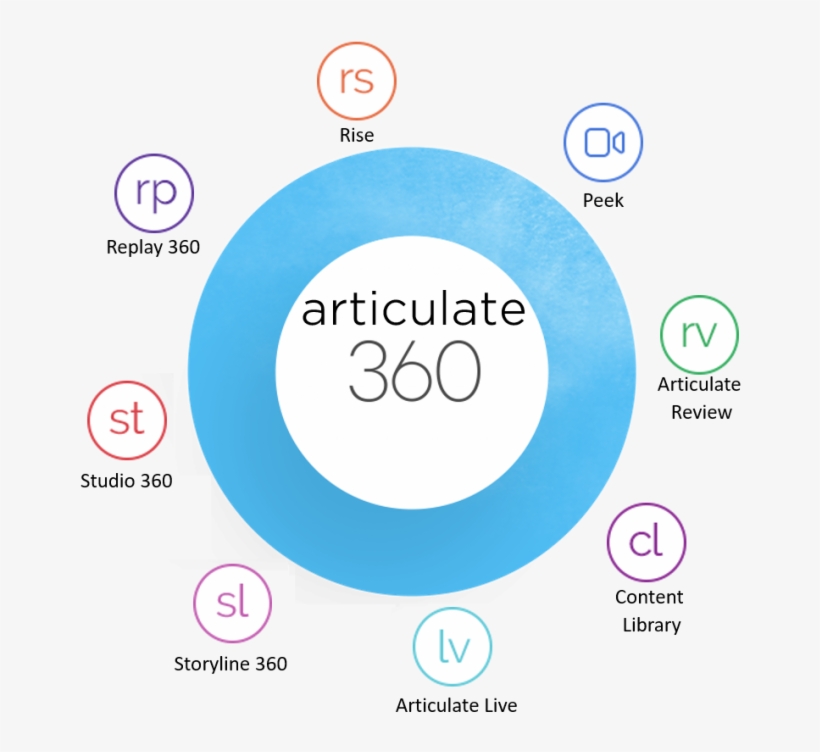

As an accidental Instructional Design making the leap from higher education to the corporate sphere, Articulate 360 feels like the best foundation for starting this career. It is the most used e-learning authoring tool; after investigating its features more closely, I understand why.
The inclusion of multiple applications, the massive content library, the vibrant support community, and the promise of a quick learning curve – what more could I ask for?
As someone who may be working in higher education, a lack of accessibility features (particularly Section 508 and WCAG 2.0 support) is a big deal-breaker for me. Closed captions are an absolute requirement as well as other navigational options and screen-reader compliance. The ability to customize the look of closed captions as well as the toggle ability made Articulate 360 extremely appealing.
Additionally, I anticipate working with a number of SMEs in higher education who have relied heavily on PowerPoints for structuring their lessons and lecturing in in-person classes. As we move online and to creating true e-learning modules, Studio 360 will be an invaluable tool to easily and quickly convert dozens of PowerPoints into interactive e-learning very quickly and easily. Since it is also xAPI and SCORM compliant, I should have no issues uploading this to higher education’s favorite LMS – Canvas and Blackboard.
In sum, the many strengths and features of Articulate 360 make the subscription cost worth it to me – particularly since as an educator I am able to get the discounted annual rate of $499.
Articulate 360 Full Review
| Criteria | Evaluation Comments |
| Tool name and URL | Articulate 360 https://articulate.com/360 |
| Price | This subscription-based system is $999 for an individual freelancer; however, there is an academic discount for $499. |
| Cloud based or Desktop (Windows, Mac, PPT plug-in)? | Articulate 360 includes both web-based applications (e.g. Rise 360 and Review 360) as well as desktop-based applications (e.g. Storyline 360 and Replay 360). It also includes the PPT plug-in application Studio 360 (which further includes Presenter 360, Quizmaker 360, and Engage 360). |
| Delivery Formats | All Articulate 360 applications are xAPI (Tin Can) and SCORM compliant for integration to an LMS, and they can be exported as an MP4. Studio 360 includes its own player, Rise 360 can be hosted on the web or exported as a PDF. Storyline 360 includes the option for projects to be hosted to Articulate Online or even as a printable Word document. |
| Strengths | Interface is clean and easy to use with a minimal learning curve Branching view of slides and actions/triggers are in a convenient window in workspace Better tool for importing and upgrading PowerPoints (Studio 360 and Storyline 360) Easily create software simulations and take screenshots Allows for a lot of closed caption customization including fonts, shapes, and placement Includes numerous interaction objects (including drag-and-drop, dials, sliders, markers) |
| Weaknesses | Subscription model means recurring expenses for a suite in which a designer may not utilize all the applications equallyNo built-in roller interactions for buttons and triggersNo built-in templates or features for interactive videosNot as well optimized for responsive design compared to Adobe Captivate |
| Ease of use | Articulate 360 provides many online tutorials and guides which when combined with the numerous templates available, makes the program relatively easy to break into as a novice designer. However, the level of customization and in-depth triggers provides a lot of rigor and robust capabilities for the advanced designer. |
| Responsive Design | Articulate 360 applications all feature some level of responsive design; however, it varies. Rise 360 is the most mobile-friendly and easily moves between devices. Storyline 360 is also responsive and allows for the designer to preview the project on multiple simulated devices. However, this conversion is not optimized, and many features still work better on a desktop or laptop computer. |
| Accessibility | Storyline 360 and Rise 360 offers Section 508 and WCAG 2.0 support including alternative text for images, skippable navigation, integrated zoom, and keyboard-only navigation. Storyline 360 now offers text-to-speech which automatically syncs as closed captions. Additionally, the closed captions editor will automatically analyze the audio track to detect units of speech. It then adds caption “placeholders” to the timeline. Then captions can be typed in the placeholders. The closed captions can be toggled on or off via triggers, and the fonts can be customized. |
| Assessment Options | Storyline 360 includes a number of template quizzes and surveys including true/false, multiple choice, drop-down, numeric, and hotspot. It also integrates question banks for a more randomized experience. Quizmaker 360 (one of the three “sub-apps” included in Studio 360) also includes these assessment templates. |
| Templates (storyboard, interactions, etc.) | Rise 360 includes a variety if pre-built lesson types called “blocks” which allow for very fast generation of e-learning modules and projects. Within Studio 360, Quizmaker 360 includes 25 templates and 20 templates for pre-built interactions. Storyline 360 includes a variety of template interactions, quizzes, surveys, and more. Storyline also has a rich community where you can download new templates. |
| Content/Media Library | Content Library 360 currently includes 6 million characters, illustrations, photos, and icons that can be added to any project. It also includes additional pre-designed templates for interactive and content slides. |
| PPT Import | The application Studio 360 allows you to create interactive and highly responsive e-learning modules from PowerPoint presentations. It integrates into PowerPoint itself to either create quick projects or to upgrade existing PowerPoints. |
| Collaboration | The “Teams” subscription allows for a group to work collaboratively on a project as well as share slides between various projects. Within the program, Review 360 is a web-based collaboration tool that allows reviewers (who don’t need an Articulate 360 subscription) to view your drafts and provide feedback. This is a great alternative to the expensive Teams subscription. |
| Support and Resources | Additionally, Articulate holds a number of live online trainings and weekly webinars. There is also a vibrant online community of Articulate users like the website E-Learning Heroes. |
| Other | Though the subscription model may seem cost-prohibitive, the benefit is constant updates to the main applications and additions to the content library. In a competitive field, keeping up-to-date is crucial. |